AI Video Editor

The video editor that works like a document

Cut by deleting words, restyle captions in a click and reframe for every feed. AI video editing takes care of the busywork, and you keep the final say.

See pricing
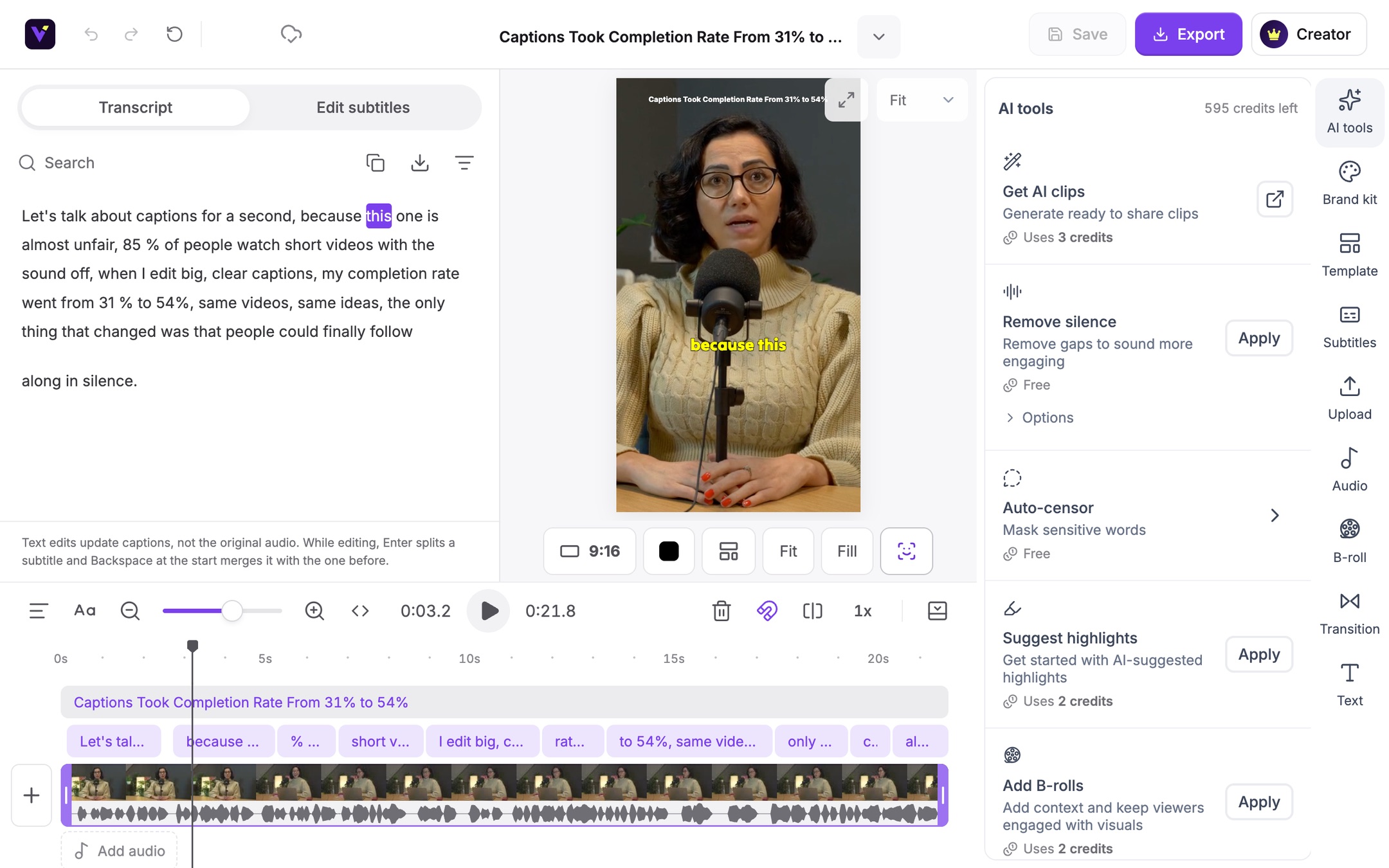
The Vidoveli video editor: transcript on the left, the clip with captions in the middle, tools on the right and the timeline below

Inside the editor

Everything a clip needs, in one workspace

No plugins and nothing to install. Open a clip and every tool below is already there.

Edit by text in the Vidoveli video editor

Edit by text

Edit the video by editing the words

The transcript is the video. Select a sentence and delete it, and the cut is made. Search for any word to jump straight to the moment it was said.

  • Delete words to cut the video
  • Remove long silences in one click
  • Bleep or mute words you do not want aired
Captions in the Vidoveli video editor

Captions

Captions that look designed, in 40 languages

Pick one of 9 animated caption styles, then make it yours: font, color, size and position. AI highlights the keywords and adds emoji where they fit.

  • Words light up as they are spoken
  • Translate captions or show two languages at once
  • Bring your own subtitles as TXT, SRT or DOC
  • Download the transcript as TXT, SRT or VTT
More about the auto caption generator
Auto reframe in the Vidoveli video editor

Auto reframe

One recording, every aspect ratio

Switch between 9:16, 1:1, 4:5 and 16:9 at any time. Auto reframe follows whoever is speaking, split-screen layouts keep both people in view, and slides and screen recordings are enlarged so they stay readable on a phone.

  • Follows the active speaker
  • Split-screen and picture-in-picture layouts
  • Blurred, colored or image backgrounds
More about the vertical video converter
Timeline in the Vidoveli video editor

Timeline

A timeline when you need one

Add text, images, B-roll, music and sound effects on a simple timeline. Drop any of 19 transitions between two shots and preview it right away.

  • Stock B-roll, music and sound effects built in
  • AI suggests B-roll that matches the words
  • Drag to trim, split at the playhead, snap to clip edges
Brand kit and templates in the Vidoveli video editor

Brand kit and templates

Every clip on brand, without redoing the work

Keep your logo, images, videos, music, caption style and text style in one brand kit, and save any look as a template you can apply in one click.

  • Start from a built-in template or make your own
  • Your logo and caption style on every clip
  • Your own list of words to censor
Export and share in the Vidoveli video editor

Export and share

Download the MP4 or share a link

Export one clip or a whole selection, and keep editing while they render. Share a public link, with post text written for each platform.

  • Batch export selected clips
  • Public share links
  • Titles, captions and hashtags ready to copy

AI video editing tools

Six jobs you can hand to AI

Each one runs on the clip you have open. If you do not like the result, undo takes it back.

  • Remove silence

    Cuts the gaps so the clip keeps its pace.

  • Suggest highlights

    Marks the strongest lines in a full video to clip.

  • Add B-roll

    Places matching stock footage over what is said.

  • Emphasize keywords

    Highlights and enlarges the words that carry the point.

  • Add emoji

    Adds emoji to captions where they fit the line.

  • Censor words

    Bleeps or mutes profanity and masks it in captions.

FAQ

Questions about the video editor

What is an AI video editor?

An AI video editor takes over the repetitive parts of editing. Vidoveli transcribes your video, lets you cut by deleting words, writes and animates the captions, keeps the speaker in frame for vertical video, and suggests B-roll, emoji and keywords. You make the decisions; the AI does the busywork.

Do I need editing experience?

No. If you can edit a document you can edit a video here. Most changes are a click or a deleted word, and the timeline is there only when you want finer control.

Can I use the video editor without AI clips?

Yes. When you add a video, switch off “Get AI clips” and the full video opens in the editor. You can also create your own clips by selecting a range in the transcript.

Does the online video editor work in my browser?

Yes. Vidoveli runs in the browser, with nothing to install. Your projects are saved as you work, so you can leave and come back.

Which formats can I export?

Clips export as MP4 in 9:16, 1:1, 4:5 or 16:9. The Free plan exports in 720p with a watermark. Creator and Business export without it, in 1080p, or in 4K when the video you add is 4K.

Edit your first clip
in the next five minutes

Bring a long video or a YouTube link. The editor, captions and AI tools are all on the Free plan.